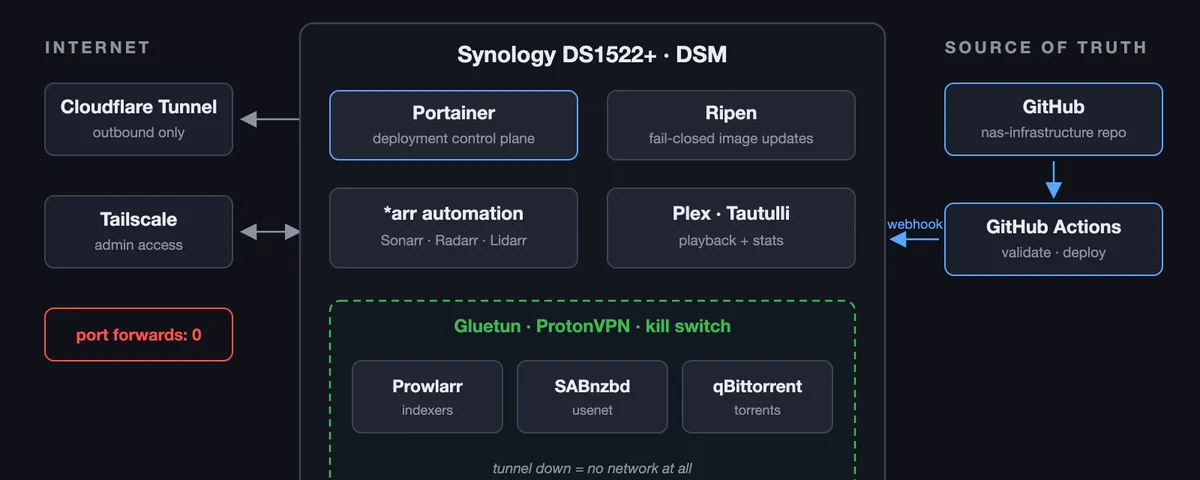
I’ve spent a few years building this setup up, one stack at a time. It started as a box that held files. These days it’s a small infrastructure project with its own Git repo, drift detection, monitoring, and a purpose-built update daemon. The rule underneath all of it: Git is evidence, and Portainer stays the deployment control plane. Nothing does bulk unattended deploys.
This is the tour: what runs on it, how the pieces fit together, where AI fits in, and the lessons that shaped it.
The hardware
Everything runs on a Synology DS1522+. Five bays, an AMD embedded CPU, 8 GB of RAM, and DSM as the operating system. The main volume is 58 TB and sits at 87 percent full, which is a problem I keep promising to deal with. On top of DSM, Portainer manages nine Docker Compose stacks.
What actually runs on it
The media pipeline is the core. Sonarr and Radarr manage TV and movies. Lidarr does the same for music. Prowlarr manages the indexers they all search, and SABnzbd and qBittorrent do the actual downloading. Plex handles playback and runs outside Docker; Tautulli watches it from a container.
Around that core: Kavita for books and comics, ytdl-sub for archiving channels before they disappear, Dozzle for container logs (behind a socket proxy, so nothing gets the real Docker socket), and a Cloudflare Tunnel for the few things that need to be reachable from outside. Comicarr, a comic automation tool I wrote, fills a gap the arr suite never covered.
The whole thing lives in a Git repo
Early on, my stacks lived in Portainer’s web editor. That means the only copy of your infrastructure is a textarea in a browser. If the NAS dies, or Portainer’s database corrupts, you’re rebuilding from memory.
So I built a repo called nas-infrastructure. Every Compose file is in Git. Selected stacks deploy through GitHub Actions and Portainer webhooks when I merge to main. The repo also carries a fleet model: a JSON file describing every expected container, network, loopback binding, and storage threshold.
A validation script fails the build on embedded credentials, broad host port bindings, privileged mode, or unexpected Docker socket mounts. A drift checker compares what Git says against what Portainer actually has deployed, so divergence gets caught before an outage instead of during one. And a read-only fleet monitor exits nonzero on unhealthy containers, dead VPN namespaces, exposed ports, or storage pressure.
This is where the rule from the top was learned. I came to distrust automation that can take the whole fleet down at once, so deploys stay small and deliberate, and Git’s job is to be the truth I can rebuild from.
The VPN that fought back
All download traffic goes through a Gluetun container running ProtonVPN. SABnzbd, qBittorrent, and Prowlarr share its network namespace, so if the tunnel is down, they have no network at all. The kill switch means a broken tunnel produces silence instead of a leak.
Getting there was a fight. The DS1522+ runs DSM on Linux kernel 4.4, which predates the UDP offload features that userspace WireGuard expects. wireguard-go probes for them at runtime but the detection is unreliable on a kernel that old, and once the tunnel drops it can’t rebuild its TUN device in-container. The tunnel dies permanently until you recreate the container. I chased that for days before accepting the conclusion: WireGuard is unusable on this host, full stop. OpenVPN is a mature C implementation that doesn’t touch any of that. It connects in under five seconds and has been boring ever since.
That fight also taught me that health flags lie. The downloaders once passed their loopback healthchecks for a full hour while resolving nothing, so now every check verifies real egress, and my monitoring asserts that the exit IP belongs to the VPN provider.
Containers that share a namespace also don’t restart when the namespace owner restarts. They keep running against a destroyed network and keep passing loopback healthchecks. I run a small watchdog that detects this and restarts them, keyed on actual egress instead of Docker’s health status.
Nothing listens on the internet
Worth calling out, because it’s the first thing people ask: the router forwards zero ports. Every service binds to loopback only, and admin access happens over Tailscale. Anything public goes out through the Cloudflare Tunnel.
Pin the digest, scan the bytes
Two habits date back to the scariest week this box ever gave me, when I found files in the media library that were executables disguised as video, imported by my own automation without complaint. That story deserves its own post; what matters here is what it changed.
Images are pinned by digest now, so a container’s behavior can’t change without a commit I reviewed. A floating :latest tag once changed behavior under me with no local change at all.
A daily scanner also walks the media library and reads the first eight bytes of every file. It ignores extensions entirely, because extensions are what an attacker controls. If the magic bytes say executable, the file gets flagged no matter what it’s called.
Ripen: the update tool I ended up building
Digest pinning created a new problem: updates now require intent. Watchtower-style auto-updaters solve that by mounting the Docker socket and pulling whatever the registry serves, which is exactly the trust model I’d stopped believing in.
So I built Ripen. It watches the registries behind the images you already run. When a new digest appears, Ripen sits on it for a day and confirms it’s still being served before calling it a mature candidate. If you’ve explicitly allowed apply mode for a stack, it updates one service at a time, pinned to the exact digest. It verifies health afterwards and rolls back the moment that fails. Then it stops and waits for you again.
It never mounts the Docker socket. The container is read-only with every Linux capability dropped, and it lives happily in 128 MB of memory. The default mode only watches. It’s on GitHub at github.com/frankieramirez/ripen if fail-closed updates sound like your kind of paranoia.
Where AI fits in
The pace of all this changed once there was an agent in the loop. Most of the scripts in the infrastructure repo came out of working sessions with Claude Code: I describe the invariant I care about, we iterate on the checks together, and the result lands as a pull request I review like anyone else’s. The validator, the drift checker, the fleet monitor, and the media scanner all started that way.
It’s also how I debug now. An agent that can SSH into the NAS and read logs across six services correlates in minutes what used to take me an evening, and the conclusions land in the repo instead of evaporating when the terminal closes.
The docs changed shape because of it. Everything in the repo is written as executable knowledge: exact commands, expected outputs, failure signatures, and the reasoning behind every non-default setting. Future me is one audience. The other is the next agent session, which can read the VPN doc and know why WireGuard is off the table on this kernel without rediscovering it the hard way. Infrastructure in Git plus docs that explain why turns out to be exactly what an AI needs to do real operations work safely.
What I’d do differently
If I started over, I’d skip the NAS appliance and build a custom PC.
The Synology has been reliable, and DSM makes storage genuinely easy. But the WireGuard saga is the whole argument in miniature: I lost days to a kernel from 2016 that I can’t upgrade, on hardware I can’t change, running an OS whose update schedule I don’t control. An appliance is convenient right up until you start doing interesting things, and then the missing control is all you can see.
A custom build means picking my own kernel, my own amount of RAM, a CPU with headroom for transcoding or local AI experiments, and drives in whatever arrangement I want. When something breaks at 4.4-kernel depth, I can actually fix it.
If you’re buying your first home server and you mostly want storage plus a few containers, the appliance is a fine on-ramp. If you already know you’ll end up with a Git repo, a drift detector, a fleet monitor, and a purpose-built update daemon, build the PC. You’ll grow into it.
Questions about any piece of this, ask. The repo layout, the VPN config, the monitoring scripts, and Ripen itself are all things I’m happy to go deeper on.